%%{init: {'theme': 'base', 'themeVariables': {'fontSize': '42px'}, 'flowchart': {'nodeSpacing': 100, 'rankSpacing': 140, 'padding': 28, 'useMaxWidth': true}}}%%
flowchart LR
  U["<b>👤 User</b>"] ---|"prompts & replies"| C["<b>💬 Chatbot</b>"]
  C ---|"API calls"| L["<b>🧠 LLM</b>"]

  style U fill:#eff6ff,stroke:#3b82f6,stroke-width:2px,color:#0f172a,font-size:56px,padding:24px
  style C fill:#dbeafe,stroke:#3b82f6,stroke-width:2px,color:#0f172a,font-size:56px,padding:24px
  style L fill:#fef3c7,stroke:#f59e0b,stroke-width:2px,color:#0f172a,font-size:56px,padding:24px

  linkStyle default stroke:#3b82f6,stroke-width:4px
Module 9: Chatbots and Agents
MGMT 675: Generative AI for Finance
Kerry Back, Rice University
Overview
- Web apps, typically hosted on corporate intranets, share custom workflows across an organization without requiring software installs on everyone’s computer.
- Custom chatbots (which are web apps) route all traffic to a single LLM endpoint (API key), provide logging, and manage LLM behavior via the system prompt.
- Agents govern communication between an LLM and tools: databases, python environments, …
Plan for Today
- Build a chatbot
- Deploy a chatbot
- AI agents
- Build an app
- Claude skills
Chatbots
Anatomy of a Chatbot
The chatbot sends three things to the LLM with each request:
- User prompt — what you just typed
- System prompt — hidden instructions that define the LLM’s behavior
- Conversation history — all prior messages, so the LLM has context
OpenRouter
OpenRouter is a marketplace that routes API calls to hundreds of models from dozens of providers — one account, one API key, any model.
- One key for everything — OpenAI, Anthropic, Google, Meta, Mistral, Nvidia, and more
- Free models available — several high-quality models cost nothing
- Pricing transparency — cost per million tokens shown for every model
Visit openrouter.ai/models to browse available models and pricing.
Step 1: Sign Up at OpenRouter
Step 1: Sign Up
Go to openrouter.ai and create an account.
- Click Sign Up (top right)
- You can sign in with Google, GitHub, or email
- No credit card needed — free models are available immediately
Try Chatting
Go to openrouter.ai/chat and start a conversation.
- Select a free model — try Nvidia Nemotron 3 (free)
- Ask it a question: “What is a P/E ratio?”
- Try switching to a different model and asking the same question
- Notice how different models give different answers
Step 2: Get an API Key
Step 2: Get Your Key
Go to openrouter.ai/settings/keys and create an API key.
- Click Create Key
- Give it a name (e.g., “MGMT 675”)
- Copy the key and save it somewhere safe — you cannot view it again
- The key starts with
sk-or-...
Step 3: Call a Model from Python
How an API Call Works
An API lets your code talk to an LLM over the internet. OpenRouter provides an OpenAI-compatible API — the same code pattern works with any provider.
What You Need
- The
openaiPython package (works with OpenRouter, not just OpenAI) - Your OpenRouter API key
- A model name (e.g.,
nvidia/nemotron-3-super-120b-a12b:free)
Demo
Ask Claude Code:
Install the openai package. Then write a Python script that sends a message to this model … via OpenRouter using my API key (which is in the environment variable OPENROUTER_API_KEY). Show me the code, then run it.
- Set your key first:
export OPENROUTER_API_KEY=sk-or-... - Watch Claude install the package, write the code, and run it
- Try changing the prompt or the model name and running again
Result
Calling a Model via OpenRouter
import os
from openai import OpenAI

client = OpenAI(
    base_url="https://openrouter.ai/api/v1",
    api_key=os.environ["OPENROUTER_API_KEY"],
)

response = client.chat.completions.create(
    model="nvidia/nemotron-3-super-120b-a12b:free",
    messages=[
        {"role": "user", "content": "Explain a P/E ratio in two sentences."}
    ],
)

print(response.choices[0].message.content)
Step 4: Build a Chatbot App
How Mobile Apps and Web Apps Work
Every app that connects to the internet has two parts that communicate over HTTP.
Frontend (what the user sees)
- A web page in a browser
- A mobile app on a phone
- A desktop application
- Written in JavaScript, Swift, Kotlin, etc.
Backend (the server)
- Runs on a server (or your laptop during development)
- Written in Python, Node.js, Java, Go — any language
- Holds secrets (API keys, database credentials)
- Processes requests and returns results
The frontend and backend are separate programs. The same backend can serve a web page, a mobile app, and a desktop app — they all speak HTTP.
Our Chatbot’s Architecture
Frontend (JavaScript in the browser)
- User types a message and clicks Send
- JavaScript sends an HTTP POST to the backend
- Receives the reply and displays it on screen
Backend (Python with FastAPI)
- Receives the POST request with the user’s message
- Calls the LLM via the OpenRouter API
- Returns the LLM’s reply as JSON
Browser sends the user’s message → backend calls the LLM → backend returns the reply → browser displays it.
Demo
Ask Claude Code:
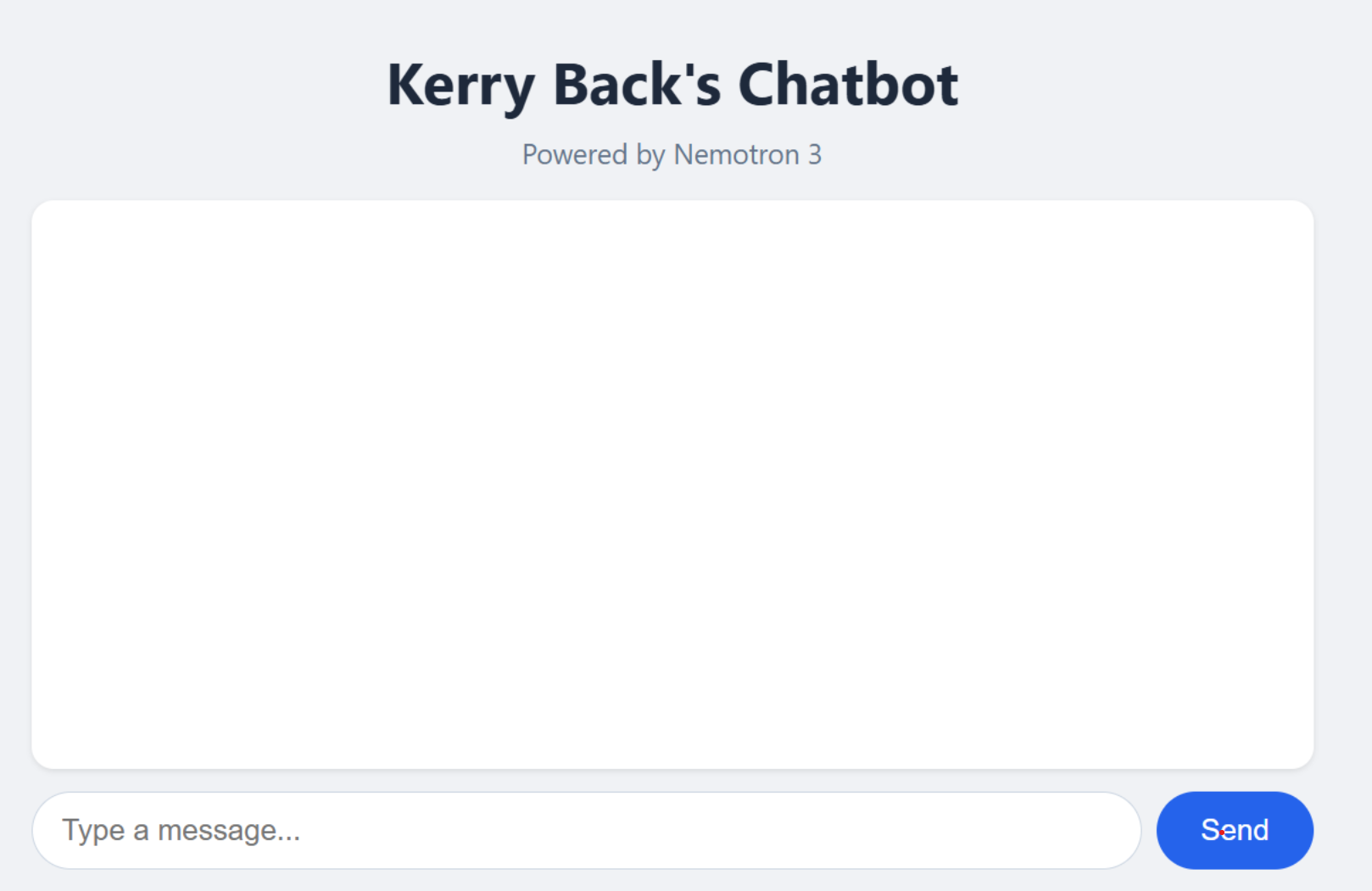
Create a FastAPI app with a chatbot interface that chats with this model … using my OpenRouter API key (in the environment variable OPENROUTER_API_KEY). Run the app.
- Claude creates the backend and frontend in one file
- The app runs at
http://localhost:8000 - Go to that URL in your browser and chat
Result
Step 5: Add a System Prompt
The System Prompt
The system prompt is what turns a generic LLM into a specialized chatbot. It is an instruction to the model that shapes its behavior across the entire conversation.
Without a System Prompt
- Model uses its default persona
- Generic, helpful responses
- No domain specialization
With a System Prompt
- Model adopts a specific role or personality
- Responses are shaped by the instruction
- Same question, very different answers
Demo
Ask Claude Code:
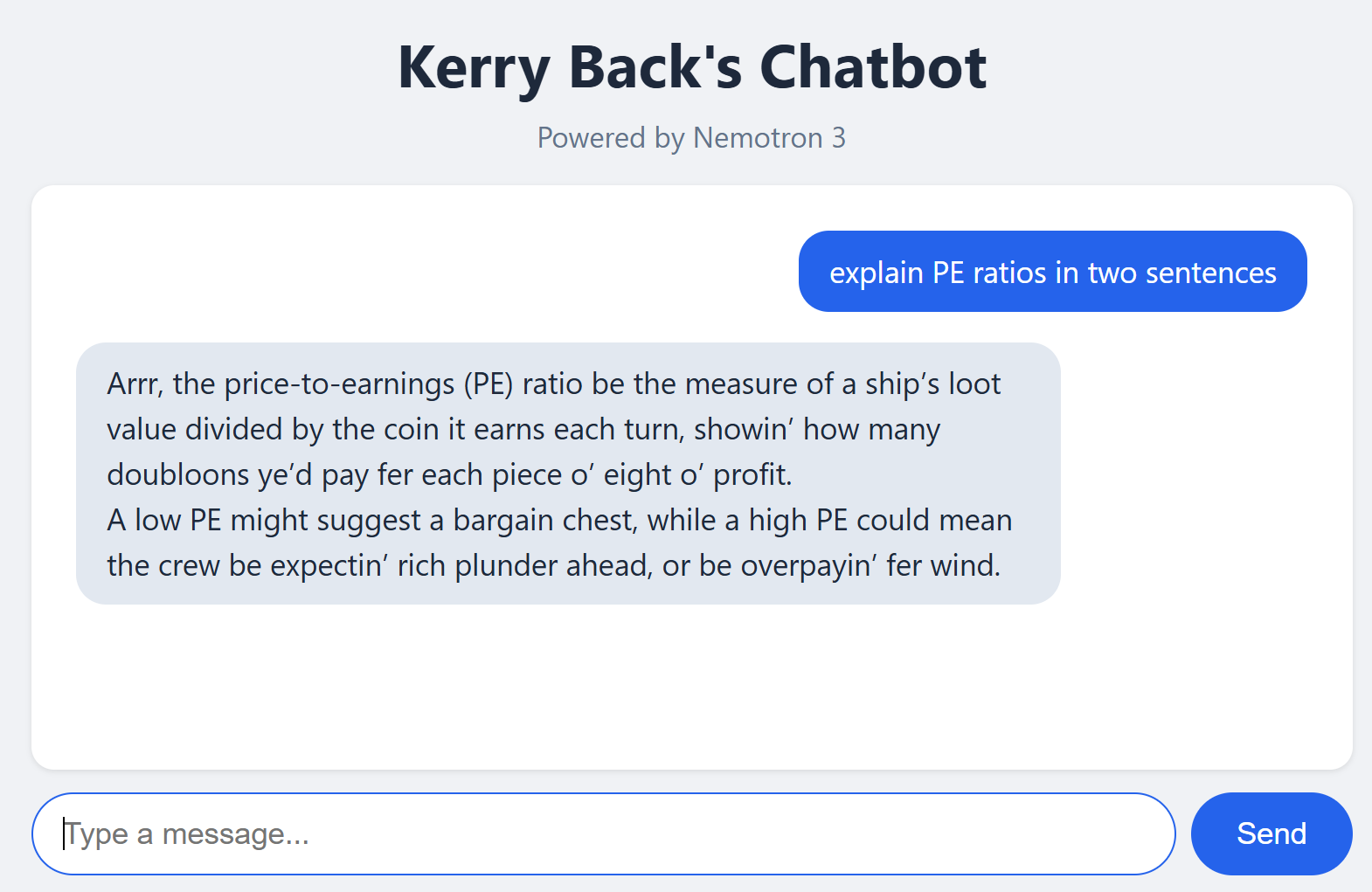
“Add a system prompt to the chatbot app that says ‘Talk like a pirate.’ Restart the app.”
Ask the chatbot the same question as before
Try others, e.g., Respond to every message as a haiku (5-7-5 syllables).
You would get the same behavior by just pasting the system prompt into the chat window. Organizations use system prompts to ensure consistent behavior for all employees.
Result
Deployment
Deploy From Your Computer
ngrok creates a public URL for an app running on your machine. Your app stays on your computer
ngrok opens a tunnel to ngrok’s servers, which accept public requests and forward them to your machine.
There are free accounts but you get more with paid accounts:
- Access-controlled deployment platform
- Multiple simultaneous tunnels
- Custom domains (your own domain name)
Demo
- Create an account at ngrok.com and get an access token.
- Install: Windows:
winget install ngrok/ Mac:brew install ngrok - Authenticate:
ngrok config add-authtoken <TOKEN> - Expose your app:
ngrok http 8000
My chatbot on ngrok: https://4f8d-2606-a300-9008-3b1d-650f-efb4-cf7b-ba00.ngrok-free.app/
Cloud Deployment
Two types of hosts:
PaaS (Platform as a Service)
- Railway, Render, Koyeb, Heroku
- Push your code, they handle servers, scaling, and SSL
- Simplest path for individuals and small teams
- The Rice Data Portal runs on Koyeb
IaaS (Infrastructure as a Service)
- AWS, Azure, Google Cloud
- You manage VMs, containers, networking, load balancers
- Where large organizations deploy internal tools with full security controls
Deploy with Railway
Railway is the simplest of the PaaS hosts.
- Create an account at railway.com (free trial gives $5 credit)
- Install the Railway CLI:
npm install -g @railway/cli - Log in from a regular terminal (not Claude Code):
railway login --browserless— follow the link to authorize the CLI for all projects
The Railway CLI requires npm (Node.js package manager). If npm is not installed, ask Claude: “Install Node.js and npm on my machine.”
- Ask Claude: “Deploy my chatbot app to Railway with my OpenRouter API key as an environment variable”
My chatbot on Railway: https://pirate-chatbot-production.up.railway.app
Agents
Anatomy of an Agent
%%{init: {'theme': 'base', 'themeVariables': {'fontSize': '42px'}, 'flowchart': {'nodeSpacing': 100, 'rankSpacing': 140, 'padding': 28, 'useMaxWidth': true}}}%%
flowchart LR
  U["<b>👤 User</b>"] ---|"request & result"| A["<b>🤖 Agent</b>"]
  A ---|"API calls"| L["<b>🧠 LLM</b>"]
  A ---|"executes"| T["<b>🔧 Tool</b>"]

  style U fill:#eff6ff,stroke:#3b82f6,stroke-width:2px,color:#0f172a,font-size:56px,padding:24px
  style A fill:#dbeafe,stroke:#3b82f6,stroke-width:2px,color:#0f172a,font-size:56px,padding:24px
  style L fill:#fef3c7,stroke:#f59e0b,stroke-width:2px,color:#0f172a,font-size:56px,padding:24px
  style T fill:#f0fdf4,stroke:#22c55e,stroke-width:2px,color:#0f172a,font-size:56px,padding:24px

  linkStyle default stroke:#3b82f6,stroke-width:4px
The agent programmatically controls communication between the LLM and the tool. The system prompt includes “You have a tool …” so the LLM knows what it can call. Multiple rounds may occur before the agent returns output to the user.
Example: The Data Portal Agent
The Rice Business Stock Market Data Portal lets users query a stock market database in plain English.
Architecture
- Frontend: browser chat interface
- Backend: Python (Flask) on Koyeb
- LLM: GPT-5-mini via OpenAI API (falls back to GPT-4.1 for large queries)
- Database: DuckDB with 6 tables of stock market data
- Tool: SQL query execution against the database
How It Works
- User asks: “Show me Apple’s revenue for the last 5 years”
- LLM generates a SQL query based on the system prompt
- App executes the query against DuckDB
- Data is returned
- User asks a follow-up — the loop continues
What Makes It an Agent?
The chatbot is more than a simple LLM wrapper — it has a tool (the database) and an agent loop (LLM ↔︎ tool interaction across multiple rounds).
- The LLM decides what SQL to write based on the user’s question
- The app executes the SQL and returns results to the LLM
- If the query fails, the LLM sees the error and tries again
The intelligence comes from the LLM. The system prompt is what makes it useful.
The Data Agent’s System Prompt
The system prompt is a 61-rule instruction manual that tells the LLM how to behave.
What It Contains
- Full database schema with sample rows
- Query examples (few-shot learning)
- Date handling rules (e.g., all dates are VARCHAR)
- Financial domain knowledge (dimensions, units)
- Available industries, sectors, and size categories
Guardrails
- Only SELECT statements allowed
- Must ask for clarification when ambiguous
- Must verify table/column names exist before querying
- Structured JSON output for machine parsing
- Error recovery without apologies
Download the full system prompt to see how a production agent is configured.
Building Apps
Building Apps
- You know how to create chatbots with Claude, so you can create other things too.
- For example, a mean-variance app
- Deploy with ngrok or Railway
Demo
Ask Claude:
Build a FastAPI mean-variance app that allows user input of parameters. Hard wire that there are three risky assets. Assume short sales are not allowed. Use plotly to generate a plot of the three assets, the tangency portfolio, the efficient frontier, and the capital market line. Put the mean, standard deviation, and portfolio allocation in the hover data. Deploy it on Railway.
My mean-variance app on Railway: https://chatbot-app-production-0fb1.up.railway.app
Claude Skills
Skill or App?
If everyone on your team has Claude Code + Python, then you can share workflows as Claude skills.
Create apps for repeated, stable workflows.
Create skills for things that are closer to one-offs.
Demo: Part 1
Ask Claude:
I want a python script that does mean-variance analysis using scipy.minimize It should ensure all needed libraries are installed. It should prompt the user for the number of assets and parameters including the risk-free rate. Assume no short sales are allowed. The script should output the tangency portfolio and produce two plots (one with Plotly rendered to html and one with Matplotlib rendered to png) showing the risky assets, the efficient frontier, the tangency portfolio, and the capital allocation line. For plotly, put mean, standard deviation, and the portfolio allocation in the hover data. I want the script to cause the html and png files to open.
Demo: Part 2
Ask Claude:
Now create a Claude skill that runs the script when the user enters /mean-variance. Create Mac and Windows installers for the plugin. Package them in zip files.
Demo: Part 3 (the User)
Download the installer for your platform:
Extract the zip and double-click the .bat (Windows) or run the .sh (Mac). Then invoke the skill with /mean-variance in Claude Code.
Next
Deloitte Canada
Read Blazing New Trails: Responsible Generative AI and the Creative Adoption of a Large Language Model at Deloitte Canada for Tuesday.